How to See Adult Games on Steam
How to see adult games on Steam: turn on the Adult Only content filter, why some games still don't show, what changed in July 2025, and how adult add-ons work.
On this page 10 sections
- How to Turn On Adult Content on Steam
- Why Some Adult Games Still Don’t Show Up
- What Changed in July 2025
- How Adult Content Add-Ons (DLC) Work
- Hiding Adult Games Again
- Finding Good Adult Games on Steam
- Steam Deck and Big Picture Mode
- Shared Computers and Family View
- Buying Adult Games Safely on Steam
- Frequently Asked Questions
Steam sells thousands of games with mature and sexual content, but you won’t see most adult games on Steam until you change one setting. Games marked “Adult Only Sexual Content” are hidden by default: they don’t appear in search, on the front page or in your recommendations. This guide shows how to turn them on, why some games still won’t appear, what changed in July 2025, and how “adult content add-ons” work.
Key Takeaways
- Steam hides Adult Only Sexual Content by default; enable it in your store preferences.
- Some players report the adult setting doesn’t save while “Frequent Violence or Gore” is ticked; unticking it can help.
- In July 2025, Valve removed certain adult games after pressure from payment processors and updated its content rules.
- Many games sell a “safe” base game plus an adult content add-on (DLC).
How to Turn On Adult Content on Steam
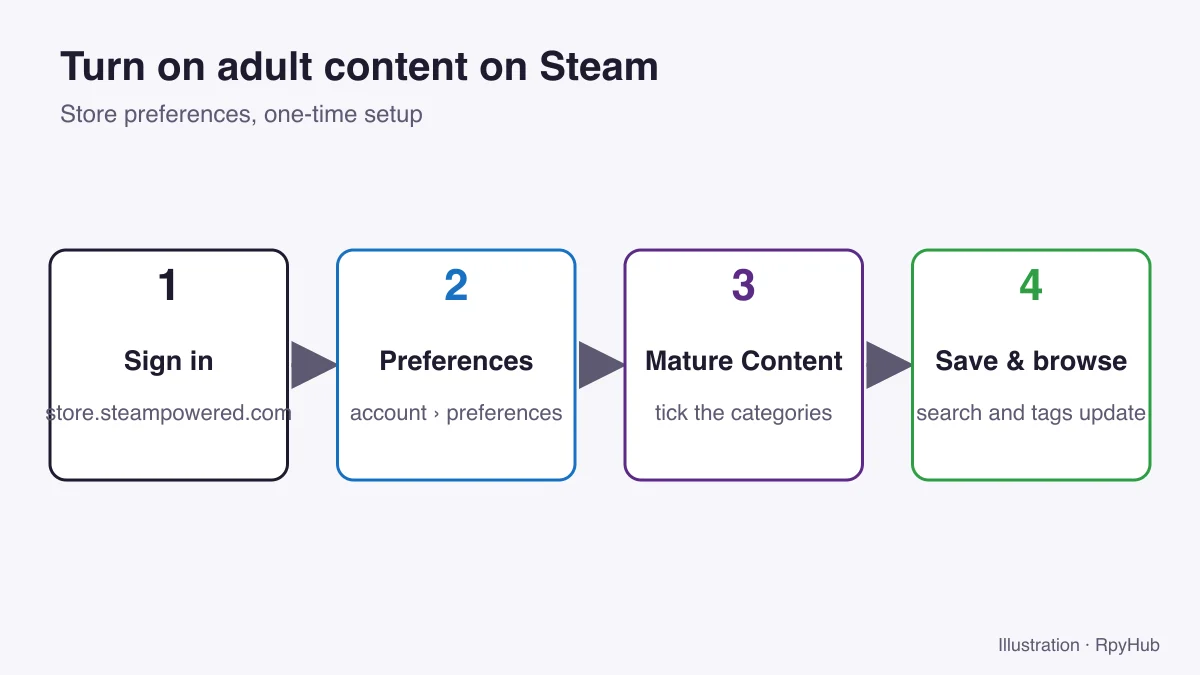
- Sign in to Steam in the app or at store.steampowered.com. Your account needs a date of birth showing you’re an adult.
- Open your store preferences: click your account name in the top right of the Store → Preferences, or go to
store.steampowered.com/account/preferences. - Find the Mature Content section. It lists categories such as general mature content, some nudity or sexual content, frequent violence or gore, and Adult Only Sexual Content.
- Tick the categories you want to see. For adult games, tick Adult Only Sexual Content (and usually “Some Nudity or Sexual Content” as well).
- Scroll down and make sure the change is saved, then return to the Store.
Steam documents that these adult-only games are hidden by default and won’t appear in search until you enable them in your account preferences (How-To Geek, retrieved 2026-11-11).
If the setting won’t stay ticked
Some players report a quirk: with Frequent Violence or Gore ticked, the Adult Only Sexual Content box doesn’t save. Unticking the gore option, saving, then trying again has fixed it for them (reported in the same guide’s user notes). If it still won’t save, check that your account’s date of birth is set and that you’re signed in to the correct account.
Why Some Adult Games Still Don’t Show Up
Even with the filter on, you may not find a particular game. Common reasons:
- Regional restrictions. Some games or add-ons aren’t sold in every country.
- Steam client vs browser. Preferences apply to your account, but a cached page may show old results. Reload the store or restart the client.
- The game was removed. Some adult games were taken down in July 2025 (see below).
- The adult content is a DLC. The base game is listed normally, while the uncensored content is a separate add-on that only appears when the filter is on.
- It was never on Steam. Many adult indie games are distributed through Patreon, SubscribeStar, itch.io or the developer’s own website.
What Changed in July 2025
In July 2025, Valve confirmed it had removed a number of adult games from Steam, saying it had been notified that certain games “may violate the rules and standards set forth by our payment processors and their related card networks and banks” (PC Gamer, retrieved 2026-11-11). Steam’s publishing guidelines were updated at the same time to forbid content that could violate those rules.
The removals focused on specific categories of extreme content. Mainstream adult visual novels and RPGs with consensual content generally stayed on sale, but the episode made many developers more cautious, and some moved part of their content to separate add-ons or other storefronts.
The same pressure campaign affected itch.io, which hid adult games from search for a time; our guide to finding NSFW games on itch.io explains what came back.
How Adult Content Add-Ons (DLC) Work
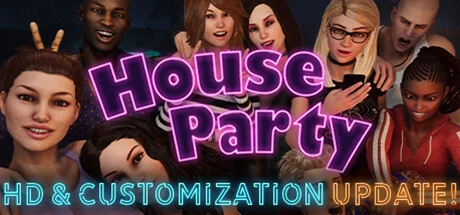
Image: House Party, official Steam store art.
Many adult games on Steam use a two-part model:
| Part | What it is | Who sees it |
|---|---|---|
| Base game | The game with censored or toned-down scenes | Everyone, rated “Mature” |
| Adult add-on / patch | A DLC that restores the full adult content | Only players with the adult filter on and of legal age |
A well-known example is the 3D comedy game House Party, which returned to Steam in 2017 with censorship and later offered an explicit content add-on for adult players (PC Gamer, retrieved 2026-11-11). If a game feels oddly censored, check its store page for a free or paid adult add-on.
Hiding Adult Games Again
If you share your computer or want a cleaner store, untick the same categories in Store Preferences. You can also use Ignore on individual games so they stop appearing in recommendations, and Steam’s Family View can restrict what other users of the device can see.
Finding Good Adult Games on Steam
Once the filter is on:
- Browse tags such as “Visual Novel”, “Dating Sim”, “RPG” and “Sexual Content”.
- Sort by user reviews rather than release date to skip low-effort titles.
- Read recent reviews for notes on updates and content changes.
- Check the developer for other projects; many make several games in the same style.
For recommendations, see our best NSFW games of 2026 and the complete guide to adult visual novels. On RpyHub you can also filter by platform and language.
Steam Deck and Big Picture Mode
Content preferences belong to your Steam account, not a single device. Once you enable adult content in the store preferences, the setting applies on your PC, in Big Picture mode and on a Steam Deck signed in to the same account. If the store on a Steam Deck still hides adult games, restart the Steam client so it picks up the change.
Shared Computers and Family View
- Use separate Steam accounts for each person; the adult filter follows the account.
- Family View lets an account holder restrict which parts of Steam and which games other users can see on that device.
- Steam’s Family features can also manage what children’s accounts can access.
Buying Adult Games Safely on Steam
- Read the content descriptors on the store page; developers describe the mature content their game contains.
- Check whether adult content is a DLC. The base game and the adult add-on may be separate purchases.
- Know the refund policy. Steam generally allows refunds for purchases made within 14 days and played for under 2 hours, which gives you room to try a game.
- Check regional availability before recommending a game to friends in other countries.
Frequently Asked Questions
How do I see adult games on Steam?
Sign in, open Store Preferences (store.steampowered.com/account/preferences), tick Adult Only Sexual Content under Mature Content, and save.
Why are adult games hidden on Steam?
Valve hides Adult Only games by default. They appear only for signed-in adult users who enable the filter.
Why won’t Steam save my adult content setting?
Players report that the setting may not save while “Frequent Violence or Gore” is ticked. Untick it, save, and try again.
Did Steam ban adult games?
No. In July 2025 Valve removed certain adult games under pressure from payment processors and tightened its rules, but many adult games remain on sale.
What is an adult content DLC on Steam?
A separate add-on that restores the full adult content of a game whose base version is censored. It only appears to adult users with the filter enabled.
Does the Steam adult filter work on Steam Deck?
Yes. The setting is tied to your account, so it applies on any device signed in to it. Restart Steam if the store doesn’t update.
Can I get a refund for an adult game on Steam?
Steam’s standard refund policy applies: generally within 14 days of purchase and under 2 hours of playtime.









Comments
0