How to Make a Visual Novel with Ren’Py: Beginner Tutorial (2026)
Ren’Py is the most popular free engine for visual novels, and you can make a visual novel with Ren’Py without being a programmer. Its script language reads almost like a screenplay: you write who speaks, what they say, which image is on screen and which choices the player gets. Ren’Py handles saving, menus, rollback and building the game for different systems.
This tutorial takes you from downloading Ren’Py to a playable first scene with a choice, and then to a build you can share.
Key Takeaways
- Download the Ren’Py SDK from renpy.org, unpack it and open the launcher.
- Create a project; your story lives in
game/script.rpy.- Characters are defined with
define, images are shown withsceneandshow, and choices usemenu.- Use Build Distributions in the launcher to create Windows, Mac and Linux versions.
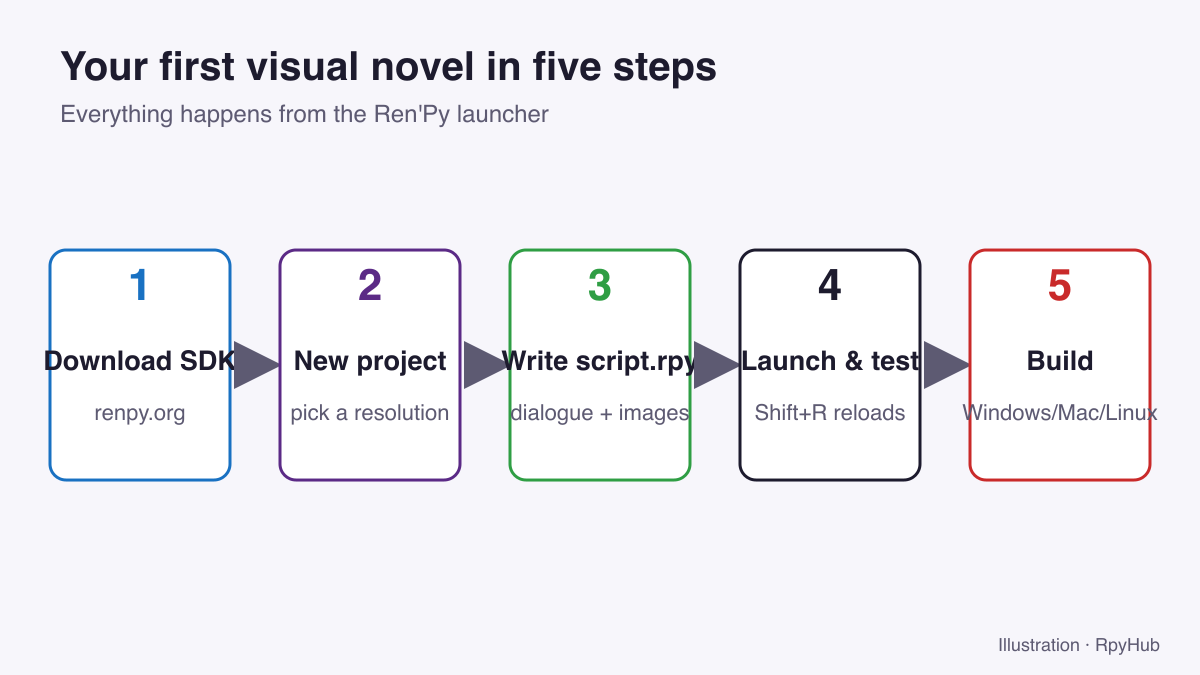
Step 1: Download Ren’Py
- Go to renpy.org and download the latest SDK for your system.
- Unpack it to a folder such as
Documents/renpy-sdk. - Start the launcher:
renpy.exeon Windows,renpy.appon Mac,renpy.shon Linux.
The launcher includes two sample projects, The Question and the Tutorial. The Tutorial is a playable guide to Ren’Py’s features, and it is worth ten minutes before you start.
Step 2: Create a New Project
- In the launcher, click Create New Project.
- Choose a name, such as “My First VN”.
- Pick a resolution. 1920×1080 is a good default for modern screens.
- Pick a colour theme for the default interface. You can change it later.
Ren’Py creates a project folder with everything you need:
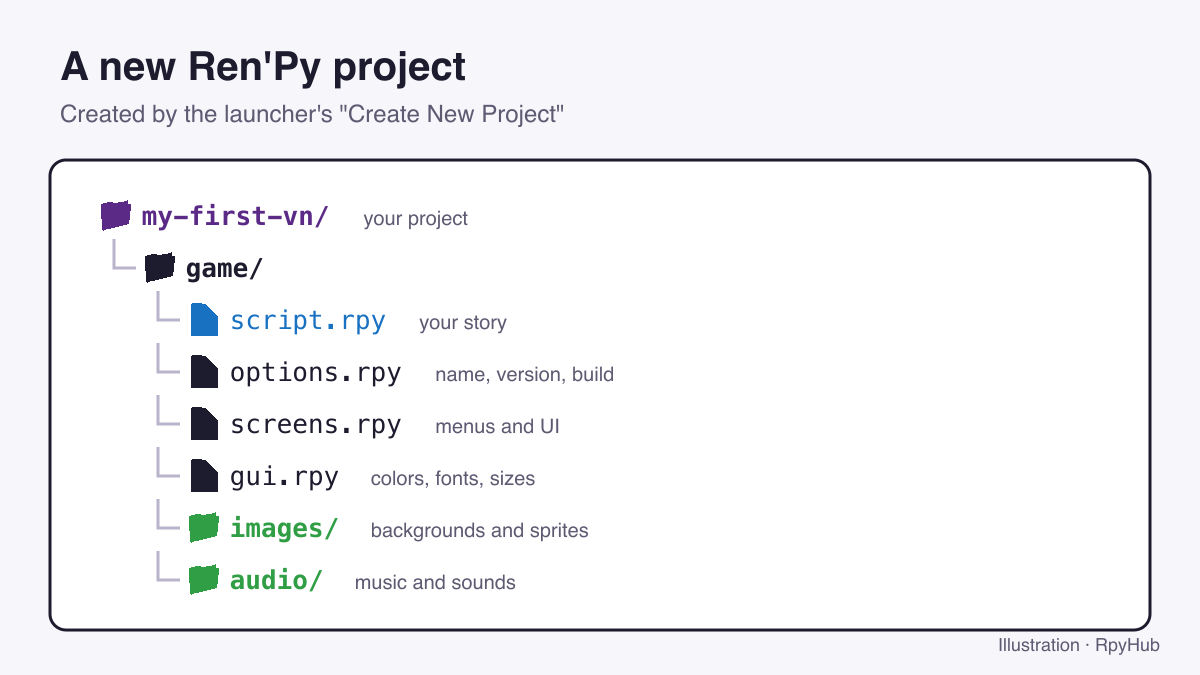
script.rpy: your story.options.rpy: game name, version and build settings.screens.rpyandgui.rpy: menus and interface look.images/andaudio/: your art and sound.
Click Edit script.rpy in the launcher to open it in a text editor. The launcher can download Visual Studio Code with Ren’Py support for you.
Step 3: Write Your First Scene
Replace the contents of script.rpy with this:
define m = Character("Mia", color="#c8a2ff")

label start:

    scene bg cafe
    show mia happy

    m "Hi! You're finally here."
    m "I wasn't sure you'd come."

    "She pushes a cup of coffee across the table."

    return
What each line does:
define m = Character("Mia", ...)creates a speaker called Mia with a name colour.label start:is where every Ren’Py game begins.scene bg cafeclears the screen and shows a background.show mia happyshows Mia’s sprite.m "..."is a line of dialogue spoken by Mia. A line without a speaker is narration.returnends the game.
Indentation matters: everything inside label start: is indented by four spaces.
Step 4: Add Images
Ren’Py finds images automatically in the game/images/ folder. File names become image names:
bg cafe.png→scene bg cafemia happy.png→show mia happy
If an image is missing, Ren’Py shows a placeholder, so you can write the whole story first and add art later. Need art? See where to find free visual novel backgrounds and how to check their licenses.
Step 5: Add a Choice
Choices use menu. Each option jumps to a different part of the story:
    m "So... do you want to stay for a while?"

    menu:
        "Stay and talk":
            jump stay

        "Make an excuse and leave":
            jump leave

label stay:
    m "Great! I have so much to tell you."
    return

label leave:
    m "Oh... okay. Maybe next time."
    return
To remember a choice for later, store it in a variable:
default stayed = False

label stay:
    $ stayed = True
    m "Great! I have so much to tell you."
Then check it later with if stayed:.
Step 6: Test Your Game
Click Launch Project in the launcher. While the game is running, press Shift+R to reload after editing the script. Use the launcher’s Check Script (Lint) to catch mistakes such as missing images or typos in labels.
If the game shows an error screen, the message names the file and line that caused it. Fix it, save, and reload.
Step 7: Build and Share
- Open
options.rpyand set the game’s name and version. - In the launcher, click Build Distributions.
- Choose the platforms: PC (Windows and Linux) and Mac.
- Ren’Py creates
.zipfiles you can upload to itch.io or share.
For phones, Ren’Py can also build Android versions; that needs a few extra tools and is covered in Ren’Py’s Android documentation.
Tips for Your First Visual Novel
- Start small. A 15-minute story with one choice teaches you more than an unfinished epic.
- Write first, art later. Placeholders let you test pacing before spending time on images.
- Save your project in version control or at least back it up regularly.
- Play other visual novels with an eye on pacing, choices and how scenes start and end. Our guide to what a visual novel is covers the common structures.
Frequently Asked Questions
Is Ren’Py free?
Yes. Ren’Py is free and open-source, and you can sell games made with it.
Do I need to know Python to use Ren’Py?
No. Basic visual novels only need Ren’Py’s script language. Python is useful later for advanced features.
What resolution should my Ren’Py game use?
1920×1080 is a common choice for new projects. Choose it when you create the project, since changing it later means resizing your art.
Can I make an Android version of my Ren’Py game?
Yes. Ren’Py can build Android packages after you install the required tools from the launcher.
Conclusion
Download the SDK, create a project, write your story in script.rpy with define, scene, show and menu, test with Shift+R, and build with Build Distributions. Then share your first visual novel, and start on the next one.
Comparing tools before you commit? Read our visual novel engines comparison.



Comments
0