
How to Use VNDB (the Visual Novel Database) to Find Your Next Game
If you have ever wondered whether a visual novel has an English translation, how long it takes to finish, or what else is similar to a game you loved, the visual novel database VNDB is where players go for answers. It is a community-run, wiki-style site that catalogues visual novels, their releases, characters, staff and tags.
This guide shows how to use VNDB’s search, filters and tags to find your next game quickly.
Key Takeaways
- VNDB (vndb.org) catalogues about 67,000 visual novels and 159,000 releases, edited by its community.
- Use filters for language, platform and length, then tags for genre and themes.
- Release pages tell you which versions exist, in which languages and on which platforms.
- VNDB has user vote lists and rankings, plus a public API for developers.
What Is VNDB?
VNDB describes itself as a database that aims to collect as much information as possible about visual novels for English-speaking fans. According to its own documentation, it covers roughly 67,000 visual novels, 159,000 releases, 30,000 producers, 55,000 staff and 172,000 characters, along with around 3,000 tags and 3,300 character traits (VNDB: about, retrieved 2026-10-12).
It also tracks translations: if VNDB lists no English release for a game, there usually isn’t one. The site is supported by donations and offers a public API and database dumps.
Visual Novels vs Releases: The Key Idea
VNDB separates a visual novel (the work itself) from its releases (each version that came out). One game may have:
- an original release in one language,
- several translations,
- an “all ages” and an 18+ version,
- different platform releases (PC, Android, consoles).
When you want to know “is this available in my language on my device?”, check the releases list on the game’s page.
How to Search VNDB Step by Step
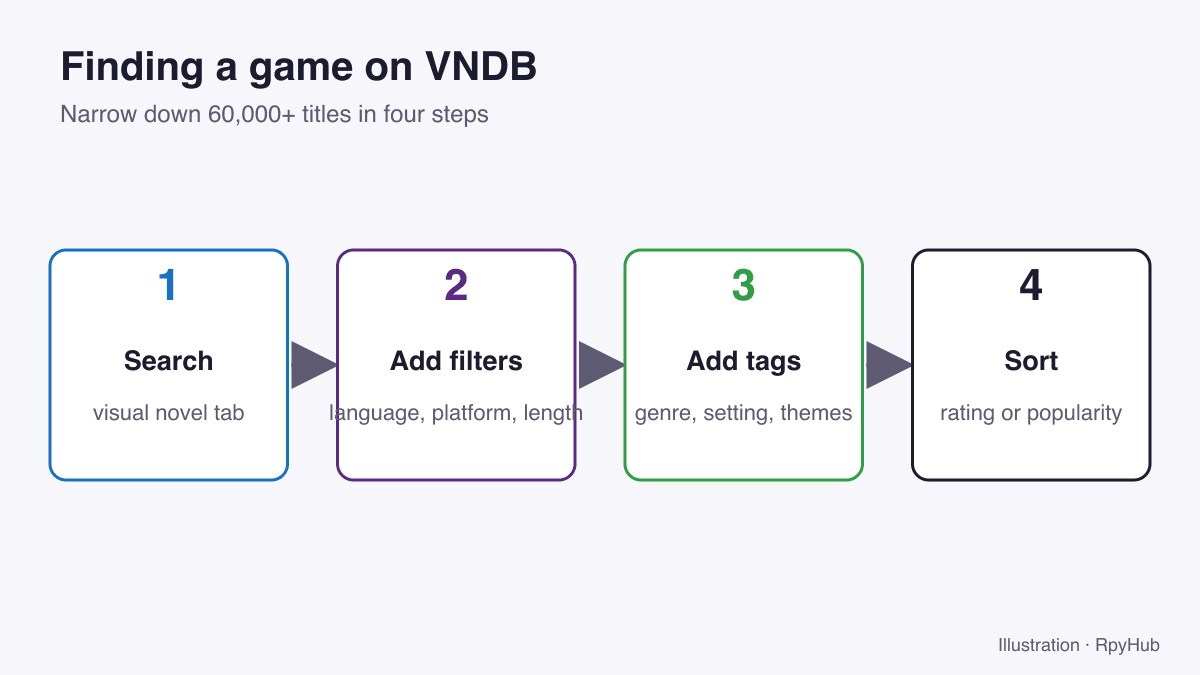
1. Start with the visual novel search
Open the Visual novels browse page and type a title, or leave the search box empty to browse everything.
2. Add filters
Use the filter panel to narrow the list:
- Language: only games available in a language you read.
- Platform: for example Windows or Android.
- Length: from very short to very long, based on community estimates.
- Release status: finished games or ones still in development.
3. Add tags
Tags describe genres, settings, themes and story features, such as “romance”, “mystery”, “school setting”, “multiple endings” or “sandbox”. Tags are voted on by users, so stronger tags appear higher on a game’s page. Combine a few tags to find games with exactly the elements you enjoy.
Tags can include spoilers. VNDB lets you hide spoiler tags, which is worth doing before you browse a game you plan to play.
4. Sort the results
Sort by rating or popularity to see what other players liked, or by release date to find new titles.
Reading a Visual Novel Page
A typical page shows:
- Description: a short synopsis.
- Length estimate: how long it takes to finish.
- Tags: genres and themes, with spoiler levels.
- Releases: every version, with language, platform and age rating.
- Characters and staff: who is in it and who made it.
- Ratings: the average vote and how many people voted.
Tips for Finding Games You’ll Enjoy
- Start from a game you loved. Open its page, note its strongest tags, and search for other games with the same tags.
- Filter by your language first. It saves you from falling for a game you can’t read.
- Check the vote count, not just the score. A high rating from a handful of votes is less reliable than a slightly lower one from thousands.
- Use length estimates to match your free time: a short game for a weekend, a long one for a month.
- Make a wishlist with VNDB’s user lists so you don’t lose track.
Using VNDB Together With RpyHub
VNDB tells you what a game is; RpyHub helps you find and play it. Once you have a shortlist, search for the titles in the RpyHub catalog, browse by language or platform, and use the wishlist to keep track. New to visual novels? Read what is a visual novel? first.
Frequently Asked Questions
What is VNDB?
VNDB (vndb.org) is a community-edited database of visual novels, with information on releases, translations, characters, staff, tags and user ratings.
Is VNDB free to use?
Yes, browsing VNDB is free. The site is funded by donations.
How do I find visual novels in my language on VNDB?
Use the Language filter on the visual novel search, then check the releases on each game’s page.
Does VNDB have an API?
Yes. VNDB offers a public API and database dumps for developers.
Conclusion
VNDB is the fastest way to answer “is this translated, how long is it, and what else is like it?” Search, filter by language, platform and length, add a few tags, and sort by rating. Then head to the RpyHub catalog to start playing.



Comments
0