
Is Ren’Py Safe? Why Antivirus Flags Ren’Py Games (and What to Do)
Is Ren’Py safe? The Ren’Py engine itself is: it is free, open-source software that has been used to make thousands of visual novels. But every Ren’Py game is still a program you run on your computer, and a game can only be as trustworthy as the people who made and shared it. That is why the real question is not “is Ren’Py a virus?” but “is this particular download safe?”
This guide explains why antivirus tools sometimes flag Ren’Py games, how to tell a false alarm from a real problem, and a simple routine that keeps you safe.
Key Takeaways
- Ren’Py is legitimate, open-source software. The engine is not a virus.
- A Ren’Py game is still a program; Ren’Py’s own documentation says to run games and mods only if you trust their creators.
- Small studios rarely code-sign their games, so antivirus “reputation” checks often flag them. A single generic warning is usually a false positive.
- Never load save files from strangers: Ren’Py saves can contain code.
Why Ren’Py Itself Is Safe
Ren’Py is an open-source visual novel engine developed in public since 2004, with its full source code and documentation available on renpy.org. Anyone can inspect what the engine does, and it is used by both hobbyists and commercial studios on Steam, itch.io and other stores.
What you download, though, is never “just Ren’Py”. It is a game built on Ren’Py by a specific developer. Ren’Py’s security documentation is direct about this: like any other software, you should only run a Ren’Py game if you trust its creator and everyone involved in getting it to you, and the same goes for mods (retrieved 2026-10-12).
Why Antivirus Programs Flag Ren’Py Games
Most warnings about Ren’Py games are false positives: the antivirus is being cautious about a file it does not recognise, not reacting to anything harmful. The usual reasons:
- No code signature. Big publishers pay for certificates that “sign” their programs. Most indie developers do not, so Windows SmartScreen and some antivirus tools treat the
.exeas unknown. - Low reputation. A game that only a few thousand people have downloaded has little reputation data. New files get flagged more often than old ones.
- Packed Python code. Ren’Py games bundle a Python runtime and compiled scripts. Some heuristic scanners find that pattern suspicious.
- Generic detection names. Labels like “Generic”, “Heur”, “ML” or “Suspicious” mean the scanner is guessing based on behaviour, not matching a known threat.
How to Tell a False Positive From a Real Threat
Look at the details of the warning before you decide.
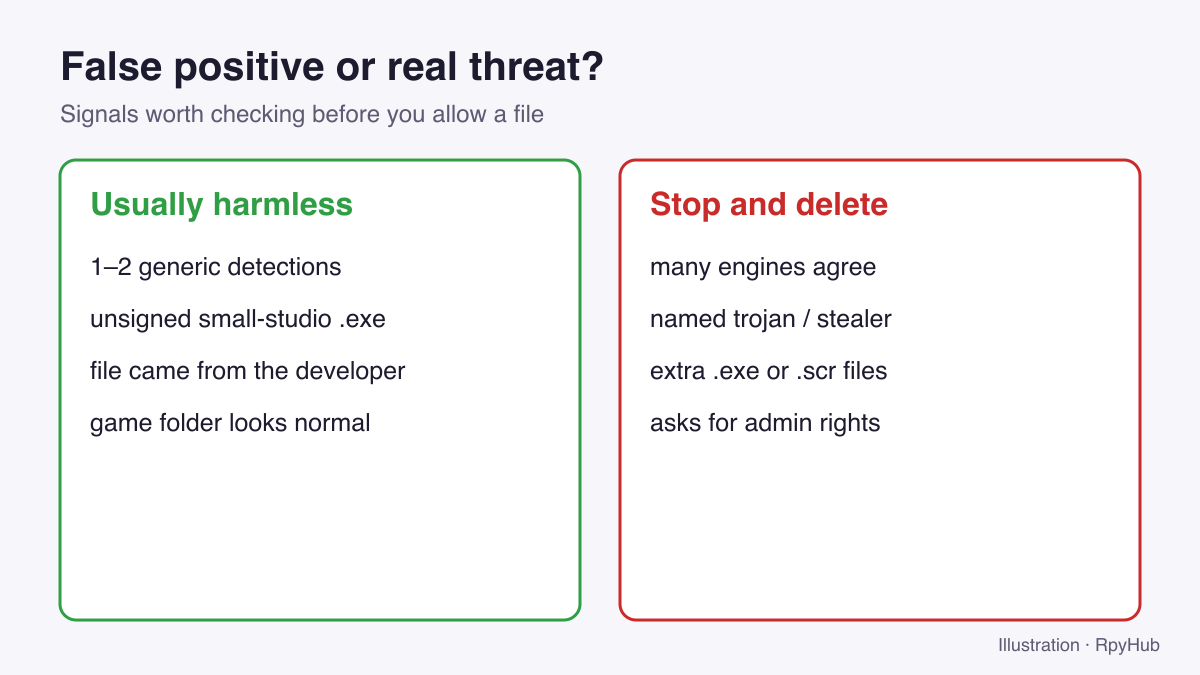
Usually a false positive:
- Only one or two scanners flag it, with generic names.
- The flagged file is the game’s main launcher (
MyGame.exe). - The game folder looks normal:
game/,lib/,renpy/and the launchers. - The download came straight from the developer or a site you trust.
Stop and delete:
- Many different scanners agree on the same specific threat name (for example a named trojan or password stealer).
- The archive contains extra programs that do not belong to a Ren’Py game, such as
.scr,.bator a second unrelated.exe. - The game asks for administrator rights. Ren’Py games do not need them.
- The “game” is an installer from an unknown site rather than a plain archive.
You can check a suspicious file with a multi-engine scanner such as VirusTotal, which runs it through dozens of antivirus products at once. One or two generic hits out of many is a typical false-positive pattern; widespread, specific detections are not.
A One-Minute Safety Routine for Every New Game
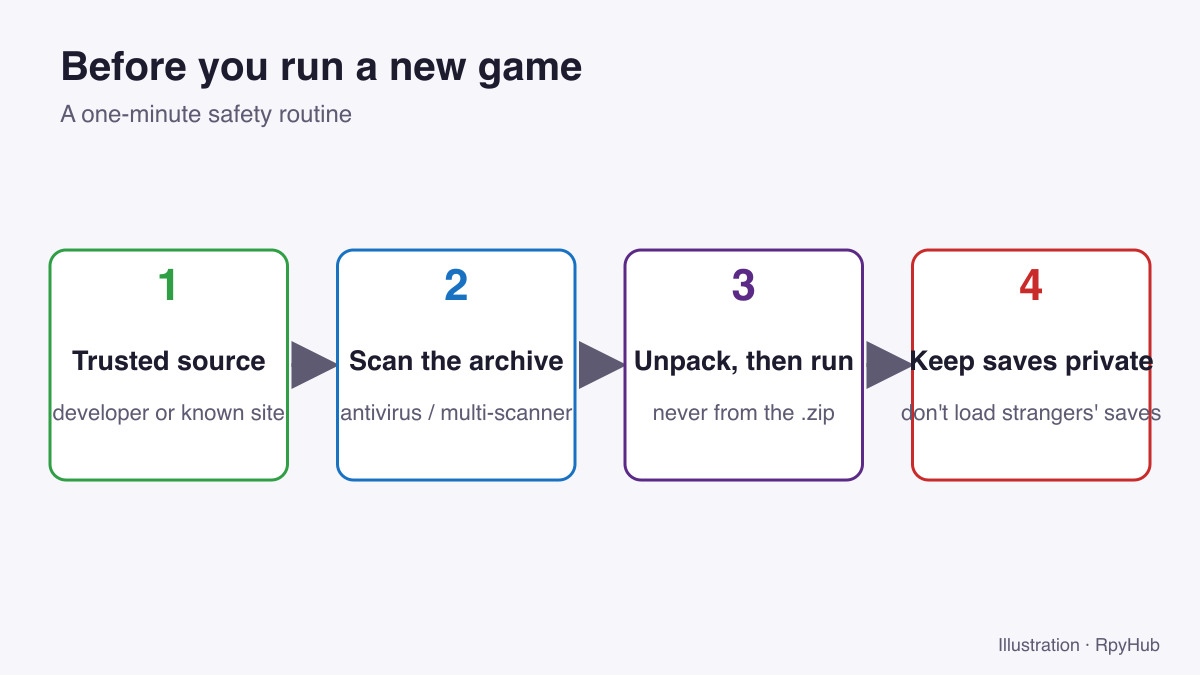
- Download from a trusted source. The developer’s own page or a site you know and trust.
- Scan the archive with your antivirus before unpacking it.
- Unpack, then run. Never run a game from inside the
.zip. Our guide to installing Ren’Py games shows what a normal game folder looks like. - Keep your saves private, and never load saves other people send you (see below).
The Hidden Risk: Save Files and Mods
Ren’Py’s save files, including the persistent file, are stored in Python’s pickle format. Ren’Py’s documentation warns that this format is powerful enough to be treated like software: if someone gets you to load a save file they created, it can run code on your computer (Ren’Py: Security, retrieved 2026-10-12).
In practice:
- Do not download “100% complete” save files from forums or file-sharing sites.
- Be careful with online save editors that send your save to a website and give you back a modified file. See our Ren’Py save editor guide for safer options.
- Only install mods from people you trust. A mod changes the game’s code, so it carries the same risk as the game itself.
Since Ren’Py 8.1, games warn you when you try to load a save that was created on a different computer, and ask whether to accept saves from that computer (Ren’Py changelog: Save Token Security, retrieved 2026-10-12). If you see that warning for a save you did not move yourself, choose No.
What to Do If Your Antivirus Quarantined a Game File
If the alert looks like a false positive and you trust the source:
- Open your antivirus’s quarantine or protection history.
- Check which file was removed and the detection name.
- If it matches the “usually harmless” pattern above, restore the file and add the game folder as an exclusion.
- If you are unsure, do not restore it. Report it to the developer, who can submit the file to antivirus vendors as a false positive.
A game with a missing file usually fails to start or closes instantly. See Ren’Py game won’t start? for other causes.
Frequently Asked Questions
Is Ren’Py a virus?
No. Ren’Py is open-source visual novel engine software. Individual games built with it can still be unsafe if they come from an untrusted source, just like any other program.
Why does Windows say “Windows protected your PC” for a Ren’Py game?
SmartScreen shows this for programs without a known signature or reputation, which includes most indie games. Click More info → Run anyway only if you trust where the game came from.
Can a Ren’Py save file contain a virus?
It can contain code that runs when loaded, because Ren’Py saves use Python’s pickle format. Only load saves you created yourself.
Is it safe to use mods in Ren’Py games?
Only if you trust the mod’s creator. Mods change the game’s code and carry the same risk as running any program.
Conclusion
- Ren’Py, the engine, is safe and open-source.
- Most antivirus warnings on Ren’Py games are false positives caused by missing code signatures and low reputation.
- Many specific detections, extra programs or requests for admin rights are real red flags.
- Treat save files and mods like software: only from people you trust.
Ready to play? Browse the full catalog or start with visual novels.





Comments
0