
Ren’Py Game Won’t Start? 12 Common Errors and How to Fix Them

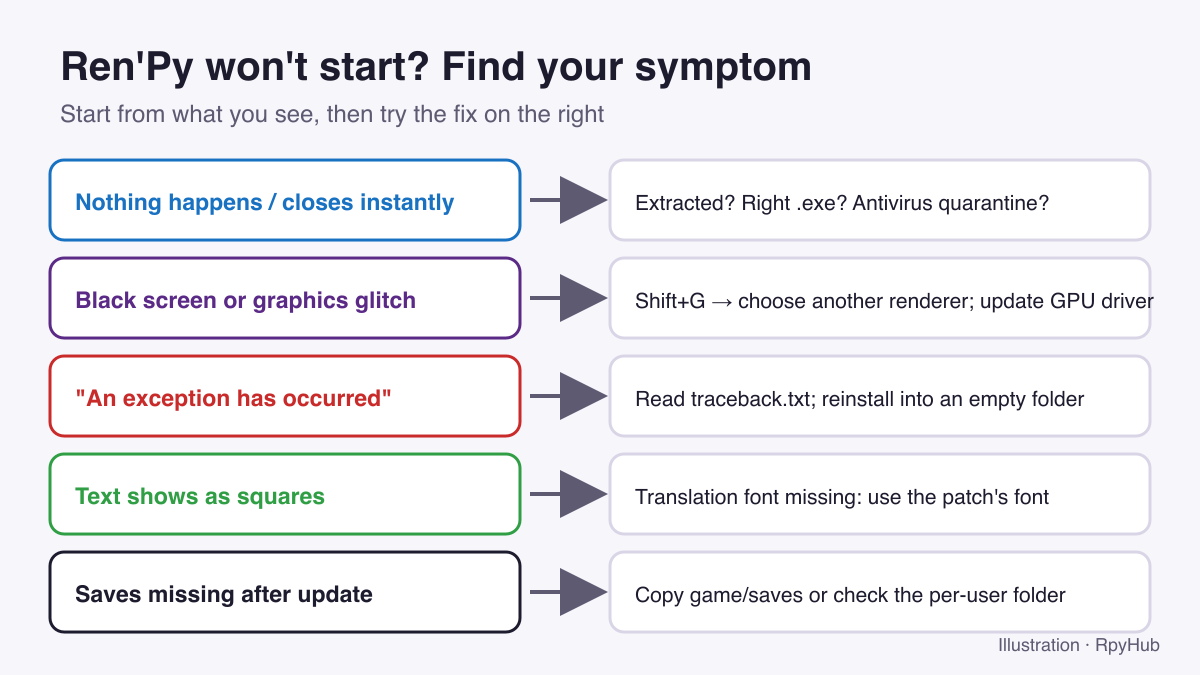
When a Ren’Py game refuses to start, the cause is almost always one of a dozen problems, and most take a minute to fix. The trick is to start from the symptom: a game that closes instantly has a different cause from one that shows a black screen or an “exception has occurred” message.
Find your symptom below, try the fix, and move on to the next one if it does not help.
Key Takeaways
- Most “won’t start” problems come from running the game from inside the
.zip, a blocked file, or an update copied over an old version.- Shift+G opens Ren’Py’s renderer menu, which fixes many black screens and graphics glitches.
- After a crash, Ren’Py writes
traceback.txt(and sometimeserrors.txtandlog.txt) in the game folder. They say what went wrong.- When in doubt, unpack a fresh copy into an empty folder.
The Game Does Not Open at All
1. You started it from inside the archive
Windows lets you open a .zip and double-click the .exe inside, but the game cannot find its other files that way. It may flash and close, or do nothing.
Fix: Right-click the archive, choose Extract All (or use 7-Zip for .7z and .rar), then start the .exe from the extracted folder. Our Ren’Py install guide shows what a correctly extracted folder looks like.
2. Windows SmartScreen or your antivirus blocked it
Small independent games are rarely code-signed, so Windows may show “Windows protected your PC”. Some antivirus programs also quarantine files from new games without telling you, which leaves the game incomplete.
Fix: On the SmartScreen warning, click More info → Run anyway. If the game still fails, check your antivirus quarantine for files from the game folder. Only restore files from a game you downloaded from a source you trust.
3. You picked the wrong launcher
Many Ren’Py games include both MyGame.exe and MyGame-32.exe. The -32 launcher is a legacy 32-bit version.
Fix: Start the main .exe with the game’s name.
4. The path is too long or unusual
Very deep folders, such as a game inside several nested download folders, can hit Windows path-length limits and cause “file not found” errors.
Fix: Move the game to a short path like C:\Games\MyGame\.
The Game Starts but Shows a Black Screen or Glitches
5. Graphics renderer problem
Ren’Py can draw the game using different renderers. If the default one does not work well with your graphics card, you may get a black screen, flickering or missing images.
Fix: Press Shift+G while the game is running to open the renderer menu and choose a different option (Ren’Py keymap: choose_renderer, retrieved 2026-10-11). Restart the game after switching. If you cannot see anything at all, try pressing Shift+G anyway; the menu may still appear.
6. Outdated graphics driver
Old drivers, especially on laptops with two graphics chips, are a common cause of crashes at start-up.
Fix: Update your graphics driver from the manufacturer (NVIDIA, AMD or Intel). On laptops, try running the game on the dedicated graphics card.
“An Exception Has Occurred”
7. A script error after an update
This screen means the game’s code hit something it did not expect. After an update, the most common cause is installing the new version over the old one, which leaves outdated files behind.
Fix: Unpack the new version into an empty folder. Copy only your game/saves folder across. See how to move saves to a new version.
On the exception screen, Rollback often lets you continue from just before the error, and Ignore sometimes skips past it. Neither fixes the cause, so save in a new slot if you continue.
8. An incompatible save or mod
Loading a save from a much older version, or using a mod made for a different version, can trigger exceptions.
Fix: Start a new game to check whether the error is tied to your save. Remove mods and translation patches, then add them back one at a time.
How to read Ren’Py’s error files
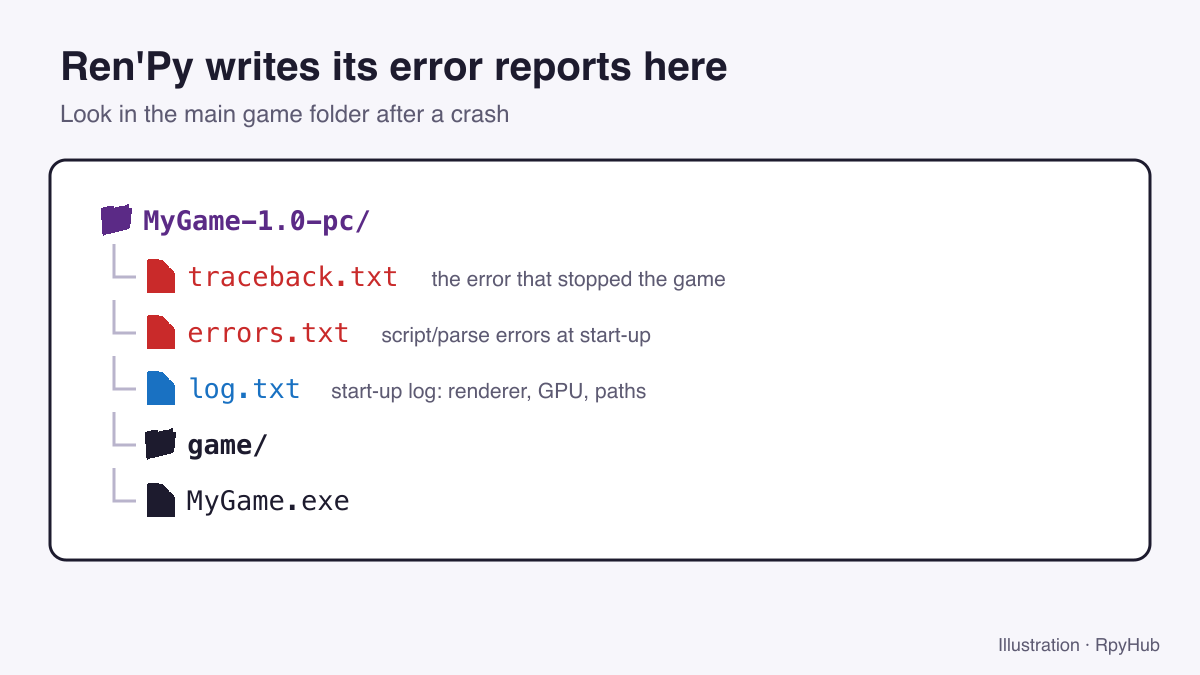
After a crash, look in the main game folder:
traceback.txt: the error that stopped the game. The first lines name the file and line where it happened.errors.txt: script problems Ren’Py found while starting.log.txt: start-up details such as the renderer and graphics card in use.
When asking the developer or the community for help, share the contents of traceback.txt and the game’s version number. That is usually enough for someone to spot the problem.
Text and Language Problems
9. Text shows as squares or boxes
This happens when a translation uses characters the game’s font does not have.
Fix: Use the font that came with the translation patch, or the patch version made for your exact game version. Our guide to installing a Ren’Py translation patch explains where the files go.
Platform-Specific Problems
10. macOS: “app is damaged and can’t be opened”
This is macOS blocking an unsigned download, not real damage.
Fix: Open Terminal, type xattr -cr followed by a space, drag the app onto the window, and press Return. Then right-click the app and choose Open.
11. Linux and Steam Deck: nothing happens
The launcher script may not be marked as executable.
Fix: Run chmod +x MyGame.sh in the game folder, or tick Allow executing file as program in the file’s properties.
12. Android: “App not installed” or crashes
“App not installed” usually means the new APK was signed differently from the version on your phone. Crashes in JoiPlay are most often an outdated Ren’Py plugin.
Fix: For APKs, back up your saves with the game’s own export or Sync option, then uninstall and reinstall. For JoiPlay, update the app and plugin from the official source: see our JoiPlay guide.
Still Not Working?
- Unpack a fresh copy of the game into an empty folder. This fixes more problems than anything else.
- Check the game page for a newer version or a known-issue note.
- Ask in the game’s comments with your system, the game version and the first lines of
traceback.txt. - If the download itself is broken, use the broken link form.
Frequently Asked Questions
Why does my Ren’Py game close as soon as I open it?
Usually because it was started from inside the .zip, a file was quarantined by antivirus, or files are missing. Extract a fresh copy into a short folder path and try again.
How do I fix a Ren’Py black screen?
Press Shift+G to choose a different renderer, then restart the game. If that does not help, update your graphics driver.
Where is traceback.txt?
In the main game folder, next to the .exe. Ren’Py creates it when the game hits an error.
Is it safe to click “Ignore” on a Ren’Py exception?
It can let you continue, but the game may behave strangely afterwards. Save in a new slot and report the error to the developer.
Conclusion
- Won’t open: extract the archive, unblock it, use the main
.exe, shorten the path. - Black screen: Shift+G, then update drivers.
- Exception: fresh install into an empty folder, check
traceback.txt. - Squares instead of text: fix the translation font.
Once the game runs, our Ren’Py keyboard shortcuts guide shows how to skip, roll back and hide the text box. Looking for something new? Browse recently updated games.






Comments
0