Ren’Py Skip Not Working? How to Skip Unseen Text and Jump to the Next Choice
Ren'Py skip stopping on new text or at every choice? How skipping works, the Unseen Text and After Choices settings, and when games block it.

On this page 8 sections
- How Skipping Works in Ren’Py
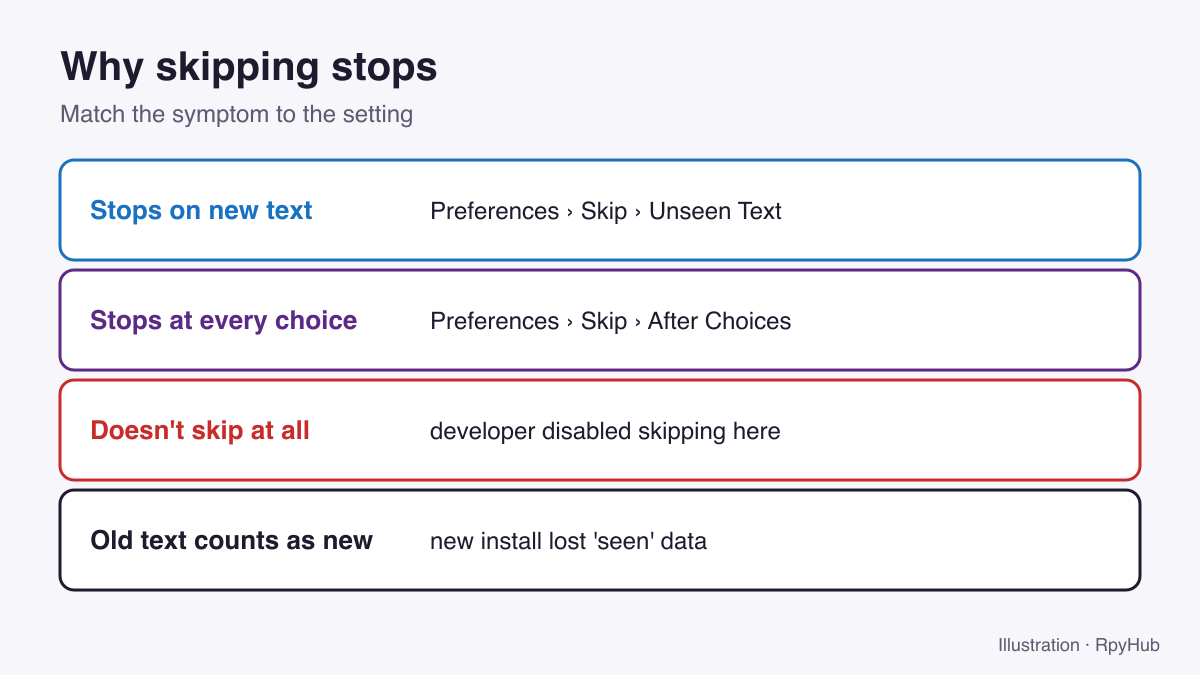
- Fix 1: Skip Stops on New Text → Turn On “Unseen Text”
- Fix 2: Skip Stops at Every Choice → Turn On “After Choices”
- Fix 3: Skip Does Nothing → The Developer Disabled It
- Why Text You’ve Read Counts as “Unseen”
- Other Things That Look Like a Skip Problem
- Frequently Asked Questions
- Conclusion
Ren’Py skip is supposed to fly through text you have already read. When it stops after a few lines, halts at every choice or does nothing at all, the cause is almost always one of three settings, and two of them you can change yourself.
Key Takeaways
- By default Ren’Py only skips text you have already seen. Turn on Unseen Text in Preferences to skip everything.
- Skipping stops at choices unless After Choices is enabled.
- Developers can switch skipping off in parts of a game or the whole game.
- “Seen” text is stored in the game’s persistent data; a fresh install can make old text count as new.
How Skipping Works in Ren’Py
- Hold Ctrl to skip while the key is held.
- Press Tab (or the Skip button in the quick menu) to toggle skip mode.
- On a gamepad there is no default skip button; map one to Ctrl.
Ren’Py’s defaults are conservative: the skip_unseen preference is off, so Ren’Py only skips text the player has read in any session, and the skip_after_choices preference is off, so a choice stops skipping (Ren’Py: preference variables, retrieved 2026-10-12).
Fix 1: Skip Stops on New Text → Turn On “Unseen Text”
- Open the game menu (Esc or right-click).
- Go to Preferences.
- Under Skip, enable Unseen Text.
Now skip mode passes through everything, including lines you have never read. Remember to turn it off again if you want to read new content.
Fix 2: Skip Stops at Every Choice → Turn On “After Choices”
In the same Skip section, enable After Choices. Skip mode will then continue after you pick an option instead of switching off.
There is no default shortcut that jumps straight to the next choice for players. Ren’Py’s “fast skip” key only works in developer mode unless the game enables it (Ren’Py: config.fast_skipping, retrieved 2026-10-12). The practical equivalent is Unseen Text + After Choices + Tab.
Fix 3: Skip Does Nothing → The Developer Disabled It
Ren’Py lets developers turn skipping off for the whole game (config.allow_skipping) or for specific scenes. If the Skip button is greyed out or Ctrl does nothing only in certain scenes, the game is doing this on purpose, often for timed sequences, minigames or important story moments. There is no setting to override it; play through that part normally.
Why Text You’ve Read Counts as “Unseen”
Ren’Py remembers which lines you’ve seen in the game’s persistent data, which is shared by all saves. That record can be lost or reset when:
- you install the game on a new computer,
- you delete the per-user save folder,
- the developer rewrites scenes in an update (changed lines count as new).
Backing up the whole save folder, including the persistent file, keeps your “seen” history. See where Ren’Py save files are.
Other Things That Look Like a Skip Problem
| Symptom | Real cause | What to do |
|---|---|---|
| Skip is very slow | Transitions play during skip | Lower or turn off Transitions in Preferences |
| Skip stops at a scene with a timer | Timed choice or pause the game requires | Let it play out |
| Ctrl does nothing anywhere | Keyboard layout or remapping app intercepts Ctrl | Try Tab or the on-screen Skip button |
| Skip works but you missed a choice you wanted | Skipped past it | Roll back with Page Up (rollback guide) |
Frequently Asked Questions
How do I skip unseen text in Ren’Py?
Open Preferences and enable Unseen Text under Skip, then hold Ctrl or press Tab.
How do I skip to the next choice in Ren’Py?
Enable Unseen Text, then press Tab to start skipping. It stops at the next choice. Enable After Choices if you want it to keep going.
Why can’t I skip in some Ren’Py games?
The developer has disabled skipping for that game or scene. There is no player setting to override it.
What is the Ren’Py skip shortcut?
Hold Ctrl to skip, or press Tab to toggle skip mode.
Conclusion
When skipping stops early, check Unseen Text; when it stops at choices, check After Choices; when it does nothing, the developer has turned it off. Keep your persistent file backed up so your read history survives reinstalls.
All the other default controls are in our Ren’Py keyboard shortcuts guide.














Comments
0